Kubernetes architecture
A Kubernetes cluster has a handful of parts working together. You will not touch most of them by hand, but knowing what each one does makes everything later much easier to follow. This lesson goes slowly and assumes you have never seen any of these words before.
First, one new word: pod
Kubernetes does not run your container directly. It wraps it in something called a pod and runs the pod. For now, read "pod" as "your container, with a thin Kubernetes wrapper around it." A pod is the smallest thing Kubernetes runs, and it runs on a node (a machine in the cluster). That is all you need for this lesson; pods get a whole topic of their own later.
Two kinds of machines
The machines in a cluster do not all play the same role. They split into two groups.
Worker nodes are the machines that actually run your pods. When your app is running somewhere, it is running on a worker node. Think of them as the hands of the cluster: they do the actual work.
The control plane is the brain of the cluster. It does not usually run your app. Its job is to make decisions and keep watch: where should this pod run, are the right number of copies alive, did something die and need replacing. The control plane holds "what you asked for" and constantly works to make the cluster match it.
You talk to the control plane and say what you want. It arranges for the worker nodes to make it real. Each side is made of a few named parts, so let us open them up.
Inside the control plane
These four parts run on the control plane and, between them, make all the decisions.
API server - the way in. Every request to the cluster goes through it: your commands, and every other part reporting in. If something wants to read or change the cluster, it talks to the API server. Nothing bypasses it.
etcd - the cluster's memory. It is a database that stores the entire state of the cluster: what you asked for, and what currently exists. When you hear "the cluster remembers," this is where it remembers.
Scheduler - the placer. When a new pod needs to run, the scheduler looks at the worker nodes and picks one that has enough room, then assigns the pod there. It decides where a pod runs.
Controller manager - the fixer. It watches the cluster and keeps reality matching your wish. You asked for three copies but only two are running? The controller manager notices the gap and gets a third started.
Inside a worker node
These three parts run on every worker node and, between them, actually run your pods.
kubelet - the node's agent. It takes the pods assigned to its node, makes sure their containers are actually running, and reports their health back to the control plane.
container runtime - the engine that starts and stops containers on the node. It is the same kind of low-level engine Docker uses. The kubelet tells it what to run.
kube-proxy - the node's networking. It sets up the rules that let traffic reach the pods on that node.
The whole picture
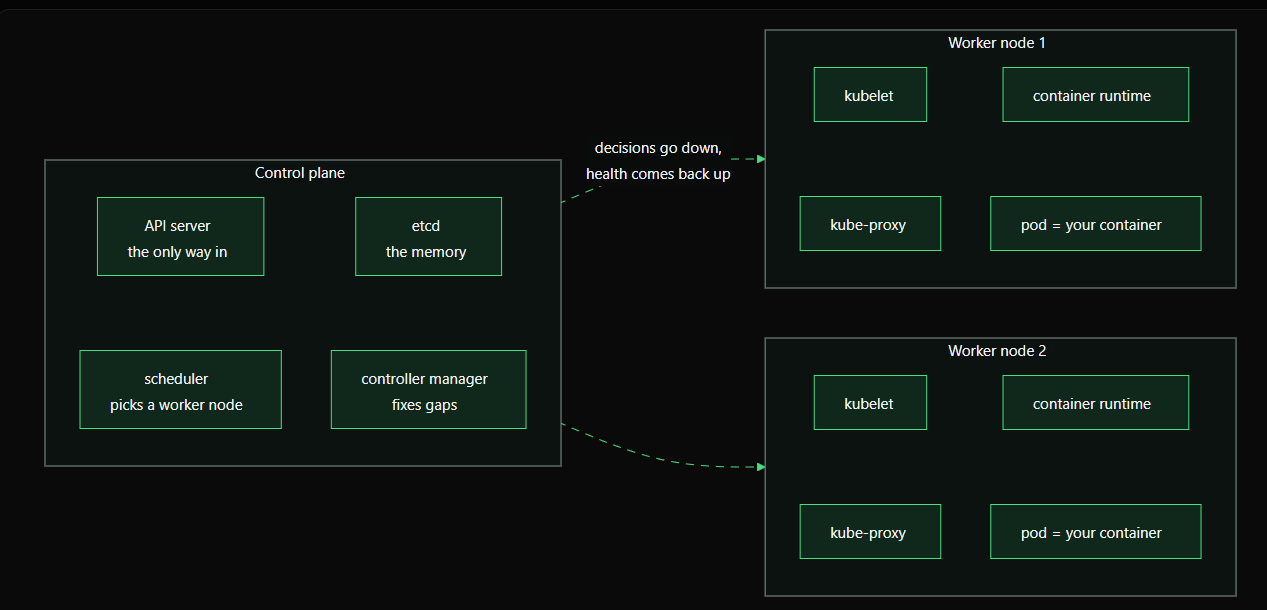
You do not need to memorize this yet. Two things are worth holding onto: every request reaches the API server first, and the kubelet on some worker node is what ends up running your container. The next lesson walks one pod through all of these parts, step by step, so you can see how they cooperate.
How a pod gets deployed
You have met the parts of a cluster. Now watch them work together. This is the single most useful thing to understand early: what actually happens, step by step, between you asking for a pod and that pod running. Follow it once slowly and the whole system stops feeling like magic.
Say you ask Kubernetes to run one pod. Here is the journey.
Step 1: your request reaches the API server
You run a command asking for a pod. It travels to the API server, the one door into the cluster. The API server checks the request makes sense (is it valid, are you allowed) and accepts it.
Step 2: the desired state is saved in etcd
The API server writes your request into etcd, the cluster's memory. At this moment your pod "exists" only as a note in etcd that says "this pod should run." Nothing is actually running yet. Kubernetes now knows what you want.
Step 3: the scheduler picks a node
The scheduler is always watching the API server for pods that have no node yet. It notices your new pod, looks at the worker nodes, and picks one with enough room. It tells the API server "put this pod on worker node 2," and the API server records that choice in etcd. The pod now has a home, but still nothing is running.
Step 4: the kubelet on that node notices
Every kubelet watches the API server for pods assigned to its own node. The kubelet on worker node 2 sees "a pod has been assigned to me" and takes responsibility for it.
Step 5: the container is started
The kubelet tells its node's container runtime to pull the image and start the container. The container runtime does exactly that. Your app is now actually running. kube-proxy on the node sets up the networking so the pod can be reached.
Step 6: the status flows back
The kubelet reports "this pod is running and healthy" back to the API server, which saves that in etcd. Now when you ask the cluster how your pod is doing, it can answer, because the real state was written back to memory.
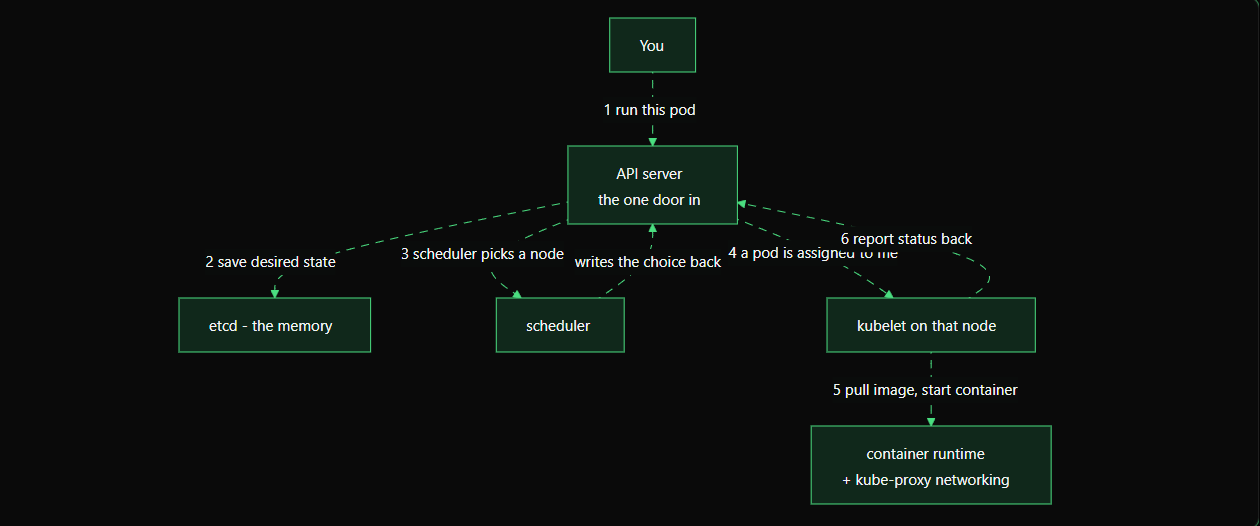
Notice the pattern: nothing talks to anything else directly. The scheduler, the kubelet, and the controllers all work by watching the API server and writing back to it, with etcd holding the record. Each part does one small job and reacts to what it sees. That loop - compare what you want to what exists, then close the gap - is the heartbeat of Kubernetes, and it is exactly why the system can heal and scale on its own.
One addition for later: when you ask for several copies of an app rather than one bare pod, the controller manager is what creates those pod records in the first place, and each one then flows through the same steps above. You will see this in action when you reach Deployments.
How a pod gets deployed
You have met the parts of a cluster. Now watch them work together. This is the single most useful thing to understand early: what actually happens, step by step, between you asking for a pod and that pod running. Follow it once slowly and the whole system stops feeling like magic.
Say you ask Kubernetes to run one pod. Here is the journey.
Step 1: your request reaches the API server
You run a command asking for a pod. It travels to the API server, the one door into the cluster. The API server checks the request makes sense (is it valid, are you allowed) and accepts it.
Step 2: the desired state is saved in etcd
The API server writes your request into etcd, the cluster's memory. At this moment your pod "exists" only as a note in etcd that says "this pod should run." Nothing is actually running yet. Kubernetes now knows what you want.
Step 3: the scheduler picks a node
The scheduler is always watching the API server for pods that have no node yet. It notices your new pod, looks at the worker nodes, and picks one with enough room. It tells the API server "put this pod on worker node 2," and the API server records that choice in etcd. The pod now has a home, but still nothing is running.
Step 4: the kubelet on that node notices
Every kubelet watches the API server for pods assigned to its own node. The kubelet on worker node 2 sees "a pod has been assigned to me" and takes responsibility for it.
Step 5: the container is started
The kubelet tells its node's container runtime to pull the image and start the container. The container runtime does exactly that. Your app is now actually running. kube-proxy on the node sets up the networking so the pod can be reached.
Step 6: the status flows back
The kubelet reports "this pod is running and healthy" back to the API server, which saves that in etcd. Now when you ask the cluster how your pod is doing, it can answer, because the real state was written back to memory.
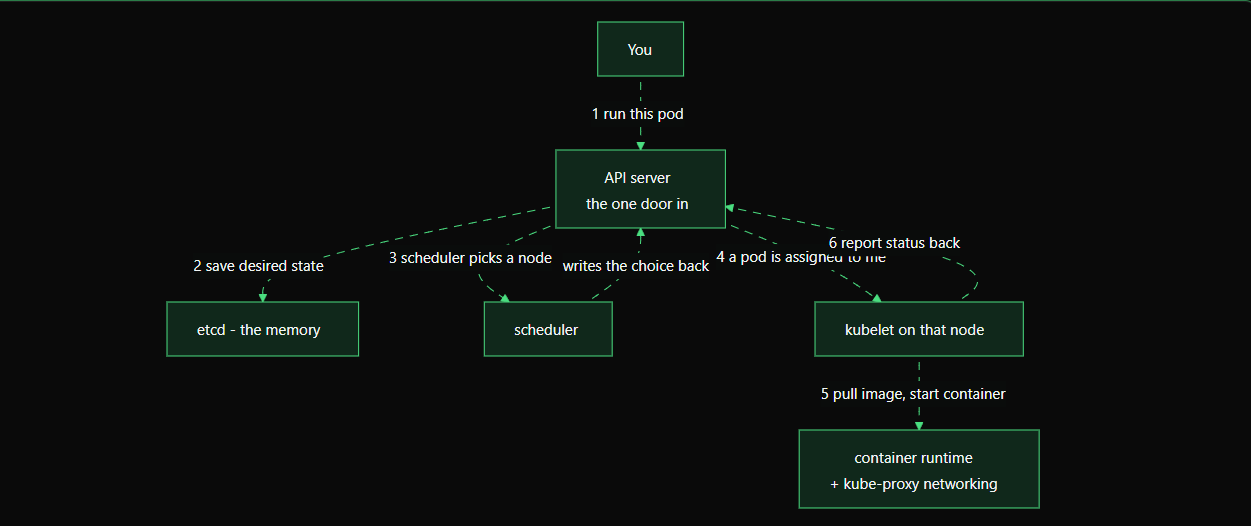
Notice the pattern: nothing talks to anything else directly. The scheduler, the kubelet, and the controllers all work by watching the API server and writing back to it, with etcd holding the record. Each part does one small job and reacts to what it sees. That loop - compare what you want to what exists, then close the gap - is the heartbeat of Kubernetes, and it is exactly why the system can heal and scale on its own.
One addition for later: when you ask for several copies of an app rather than one bare pod, the controller manager is what creates those pod records in the first place, and each one then flows through the same steps above. You will see this in action when you reach Deployments.
What Kubernetes does for you :)
Earlier you saw four situations Docker alone cannot handle. Kubernetes handles all four. Here is each pain and the Kubernetes ability that answers it, so you know what you are working toward in this skill.
Self-healing
The pain: a container crashes at 3am and stays down until a human restarts it.
Kubernetes constantly checks that the containers you asked for are actually running. If one stops, it starts a fresh replacement on its own, no human needed. This is called self-healing, and it is on by default once your app is managed by Kubernetes.
Scaling
The pain: traffic jumps tenfold and you need ten copies fast, then back to one when it calms down.
With Kubernetes you change a single number, from one copy to ten, and it starts the extra copies for you. It can even watch the load and adjust the number automatically, up during a rush and down afterward.
Rolling updates
The pain: shipping a new version means a gap where nothing is serving and users see errors.
Kubernetes replaces the old version with the new one gradually, a few pods at a time, keeping the old ones serving until the new ones are ready. Users keep getting responses throughout. And if the new version is broken, you can roll back to the previous one.
Service discovery
The pain: pods come and go, and their addresses change, so how does one part of your app reliably find another?
Kubernetes gives a group of pods a single stable name and address that does not change even as the pods behind it are replaced. Other parts of your app talk to that steady name instead of chasing individual pods.
  pain (Docker alone)           Kubernetes ability
  -------------------           ------------------
  crash stays down          ->  self-healing
  need 10 copies now        ->  scaling
  update causes downtime    ->  rolling updates
  pod addresses keep moving ->  service discovery
Every one of these gets its own topic later, with hands-on practice. For now, this is the payoff: the things that were your problem with Docker alone become the cluster's job with Kubernetes.
That's It for this topic other topic in next blog.